









Game description:
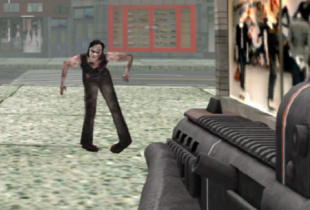
COD Zombies Browser is a browser-based shooter that translates the wave survival format into a lightweight and accessible form. The game launches directly in a web page and does not require installation or additional setup. Players are placed on a compact map where waves of zombies appear in increasing numbers. The objective is to survive as long as possible by managing movement, aiming, and limited resources. Each run is isolated, with progress resetting after defeat, which keeps the focus on execution within a single session rather than long-term advancement.
Access and Session Structure
The browser format defines the pace and structure of COD Zombies Browser. Sessions begin almost immediately, allowing players to enter gameplay without menus or configuration screens. Maps are designed to keep combat constant, with limited space that encourages continuous movement. Zombie waves advance automatically, and difficulty rises through higher enemy density and speed rather than through new mechanics. This approach supports short play sessions that can be repeated multiple times without preparation.
Core Loop and Player Responsibilities
The gameplay loop centers on survival under increasing pressure. Players earn points by eliminating zombies and use them to interact with elements of the environment. Because systems are minimal, attention is directed toward positioning and timing. Midway through a session, players typically manage the same recurring responsibilities:
· Moving to avoid being surrounded
· Aiming and shooting using mouse controls
· Reloading weapons during safe intervals
· Repairing barriers to slow enemy movement
· Adjusting routes as waves intensify
These actions repeat across waves, forming a predictable structure that becomes harder to maintain as conditions tighten.
Controls and Interface Layout
Controls in COD Zombies Browser follow common first-person shooter conventions. Movement is handled with keyboard input, while aiming and firing are controlled by the mouse. The interface is limited to essential indicators such as health, ammunition, and score. There are no layered menus or complex overlays during active play, which keeps visual focus on enemy behavior and spatial awareness. This simplicity supports fast reactions and reduces interruption during combat.
Difficulty Scaling and Player Learning
Difficulty increases through consistency rather than variation. Zombies move faster and appear in greater numbers, reducing recovery time after mistakes. The rules remain stable, allowing players to learn patterns and refine decisions across attempts. There are no character upgrades or persistent bonuses that alter gameplay flow. Improvement comes from familiarity with movement, timing, and space management.











Comments